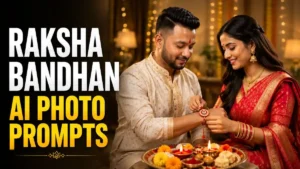
नमस्कार दोस्तों, Raksha Bandhan की फोटो में असली खूबसूरती महंगे कपड़ों या बड़ी Decoration से नहीं आती, बल्कि भाई-बहन के उस छोटे से Moment से आती है जो फोटो देखते ही अपना-सा लगे। कभी बहन Rakhi बांध रही हो, कभी भाई Gift देकर उसे Surprise कर रहा हो और कभी दोनों की एक प्यारी-सी हंसी पूरी Photo को खास बना देती है।
इसी सोच के साथ मैंने इस बार Raksha Bandhan AI Photo Editing Prompts को थोड़ा अलग रखा है। सभी Photos में सिर्फ Dress और Background बदलने के बजाय हर Prompt में भाई-बहन का अलग Moment बनाया है। कहीं Traditional Rakhi Ceremony है, कहीं Gift वाला Scene और कहीं ऐसा Candid Moment है जो मुझे खुद बाकी Results से ज्यादा Natural लगा।
नीचे 6 Trending Raksha Bandhan AI Photo Editing Prompts दिए हैं। इनके साथ मैं छोटा-सा अपना Experience भी बता रहा हूं, ताकि सिर्फ Prompt Copy करने के बजाय आपको पहले ही अंदाजा हो जाए कि किससे कैसी Photo बनेगी और कौन-सा Style आपके लिए सही रहेगा।
इस बार सिर्फ Rakhi बांधने वाली Photo नहीं, पूरा Moment खास है
मैंने इन Raksha Bandhan AI Photo Editing Prompts में एक बात का खास ध्यान रखा है कि हर Result एक जैसा न लगे। किसी में बहन Rakhi बांध रही है, किसी में भाई Gift दे रहा है, तो किसी में दोनों का ऐसा Candid Moment है जो सामान्य Festival Photo से बिल्कुल अलग दिखाई देता है।
Prompts बनाते समय मैंने Face के साथ Hands, Rakhi की सही Placement, Expressions और भाई-बहन की Natural Body Language पर भी ध्यान दिया है। क्योंकि मेरे Experience में Photo का Background कितना भी खूबसूरत हो, अगर Rakhi गलत कलाई पर हो या हाथ अजीब बन जाएं तो पूरा Result बनावटी लगने लगता है। इसीलिए नीचे दिए गए Trending Raksha Bandhan AI Photo Editing Prompts में आपको सिर्फ अलग Looks नहीं, बल्कि अलग-अलग Rakhi Moments भी मिलेंगे।
1. Beautiful Brother-Sister Raksha Bandhan AI Photo Editing Prompt
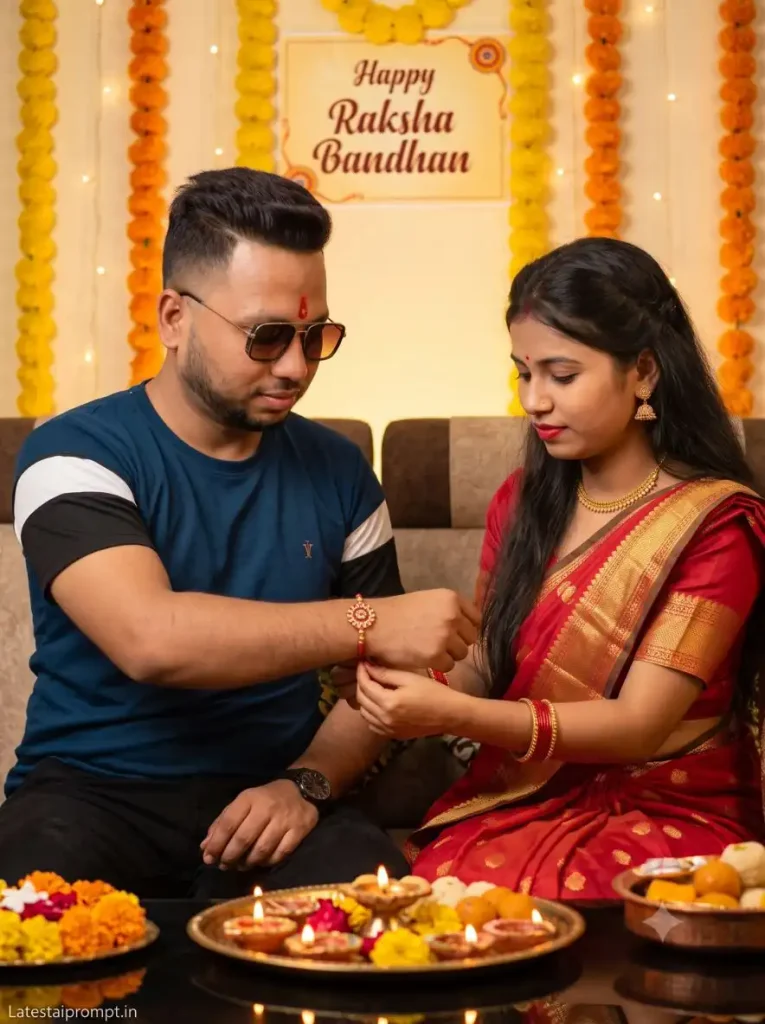
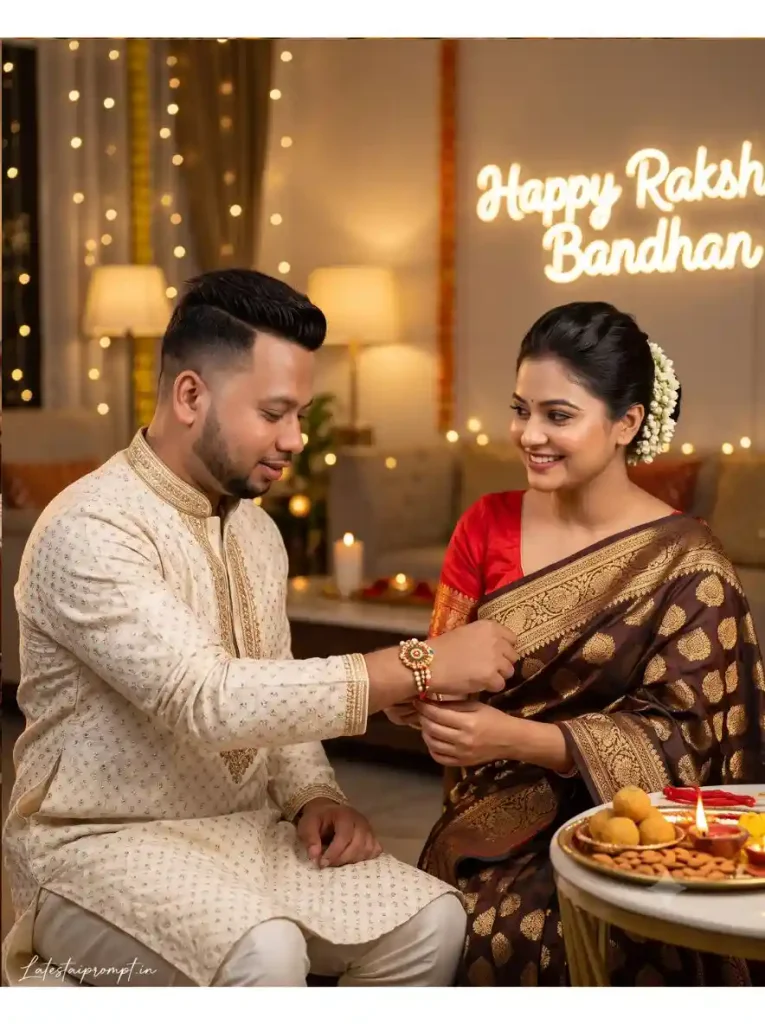
अगर आपको Raksha Bandhan की एकदम Traditional और Family Album जैसी Photo चाहिए, तो इस Brother Sister Raksha Bandhan AI Photo Prompt से शुरुआत कर सकते हैं। इसमें मैंने Rakhi को खास तौर पर भाई की Right Wrist पर रखने की Instruction दी है, क्योंकि Test के दौरान यही छोटी Detail कई बार गलत हो रही थी। Final Result में Rakhi, Thali और दोनों के Natural Expressions साथ में काफी अच्छे लगे।
Create an ultra-realistic, cinematic Indian Raksha Bandhan celebration photograph featuring a young Indian brother and sister sitting together at home in a warm, intimate festive setting.Identity & Preservation — IMPORTANT:Preserve the exact facial identity and recognizable characteristics of both subjects from the original image. Do not alter, regenerate, beautify, reshape, or replace their facial features, facial structure, expressions, age, natural skin tone, body proportions, anatomy, hairstyle, accessories, or clothing. Keep both subjects immediately recognizable as the same people from the original image. Preserve the brother’s small red tilak on his forehead exactly as present.Rakhi Placement & Action — IMPORTANT:The sister is lovingly tying a beautiful decorative red-and-gold Rakhi specifically around her brother’s RIGHT WRIST. Make the Rakhi clearly visible on the brother’s right wrist, naturally positioned and realistically wrapped around the wrist. Ensure the sister’s hands and the Rakhi placement look anatomically natural and physically accurate. Do not place the Rakhi on his left wrist.Both siblings are looking naturally toward the Rakhi with warm, genuine smiles, capturing an authentic moment of affection, love, and celebration.In the foreground, place a traditional Indian puja thali on a wooden table, beautifully arranged with sweets, glowing diya lamps, fresh flowers, and traditional Raksha Bandhan items.Create a beautifully decorated festive background featuring orange and yellow marigold flower garlands, softly glowing warm fairy lights, and an elegant wall decoration displaying the text “Happy Raksha Bandhan.” The overall environment should feel cozy, traditional, welcoming, and authentically Indian.Use warm golden cinematic lighting with soft highlights and natural shadow falloff. Add subtle cinematic bokeh and a shallow depth of field while keeping the siblings, their faces, and the Rakhi on the brother’s right wrist sharply in focus. Preserve realistic natural skin texture, authentic facial expressions, detailed traditional clothing, and lifelike material textures.Capture the scene as premium DSLR photography with an 85mm lens, f/1.8 aperture, high dynamic range, cinematic depth, crisp subject detail, photorealistic rendering, ultra-detailed textures, and 8K-quality image detail. Maintain composition with natural framing and balanced visual depth.Final Priority: Exact identity preservation, natural anatomy, authentic sibling interaction, and correct Rakhi placement around the brother’s RIGHT WRIST are the highest priorities. ASPECT RATIO: 3:4 vertical TEXT / SIGNATURE: Add “Latestaiprompt.in” bottom-left, handwritten signature-style, thin cursive strokes, small size, subtle premium elegance, white/soft off-white.
2. Trending Raksha Bandhan AI Photo Editing Prompt for Brother & Sister
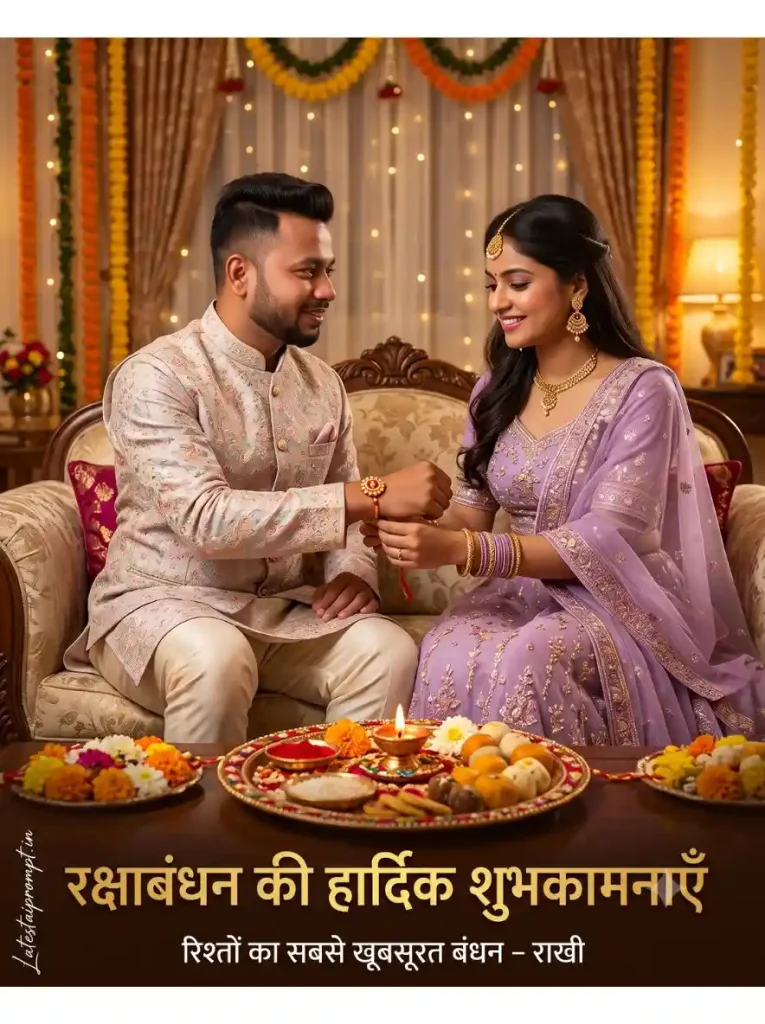
यह Beautiful Raksha Bandhan AI Photo Prompt थोड़ा Premium और Festive Look देता है। Lavender Lehenga, Pastel Kurta, Golden Decoration और नीचे Raksha Bandhan Message होने की वजह से Result सामान्य Photo से ज्यादा Festival Poster जैसा आता है। मेरे हिसाब से इसे Generate करने के बाद Hindi Text जरूर Check करें, क्योंकि बाकी Image सही होने के बावजूद AI कभी-कभी शब्द बिगाड़ देता है।
YUse the uploaded brother photo and uploaded sister photo as the ONLY face references. IMPORTANT: Preserve BOTH faces with 100% accuracy. Do NOT change facial identity, hairstyle, eyebrows, eyes, nose, lips, beard, skin tone, age, expression, or facial proportions. Keep both faces exactly the same as in the uploaded photos. No face swap, no beautification, no Al face modification.SCENE: The sister is gently tying a Rakhi on her brother’s right wrist while both are sitting together on a beautifully decorated sofa, smiling naturally. Their eye contact and expressions should show love, warmth, and sibling bonding. BROTHER: Wear an elegant pastel embroidered kurta with a matching Nehru jacket and cream trousers. SISTER: Wear a luxurious lavender embroidered lehenga with a matching dupatta, traditional jewellery, earrings, bangles, necklace, and maang tikka. FOREGROUND: A beautifully decorated Rakhi thali with diya, kumkum, rice (akshat), sweets, flowers, and festive decorations placed in front. BACKGROUND: A luxurious Indian home decorated with marigold flowers, fairy lights, festive curtains, warm golden lighting, soft bokeh, elegant decorations, and a premium festive atmosphere. TEXT: Large golden Hindi typography: “रक्षाबंधन की हार्दिक शुभकामनाएँ”Below in smaller text: “रिश्तों का सबसे खूबसूरत बंधन – राखी”Place the text neatly at the bottom without covering either face. STYLE: Ultra-realistic, DSLR quality, HDR, 8K, cinematic lighting, premium color grading, highly detailed, masterpiece, realistic skin texture, vibrant festive colors, Instagram poster (4:5).NEGATIVE PROMPT: No face change, no beautification, no face swap, no blurry faces, no extra fingers, no deformed hands, no spelling mistakes, no watermark, no low quality. ASPECT RATIO: 4:5 vertical TEXT / SIGNATURE: Add “Latestaiprompt.in” bottom-left, handwritten signature-style, thin cursive strokes, small size, subtle premium elegance, white/soft off-white. nagetive prompt: No ai effect, no cartoonist effect, no face reshaping, no ai color effect.
3. Brother Giving Gift to Sister Raksha Bandhan AI Photo Prompt
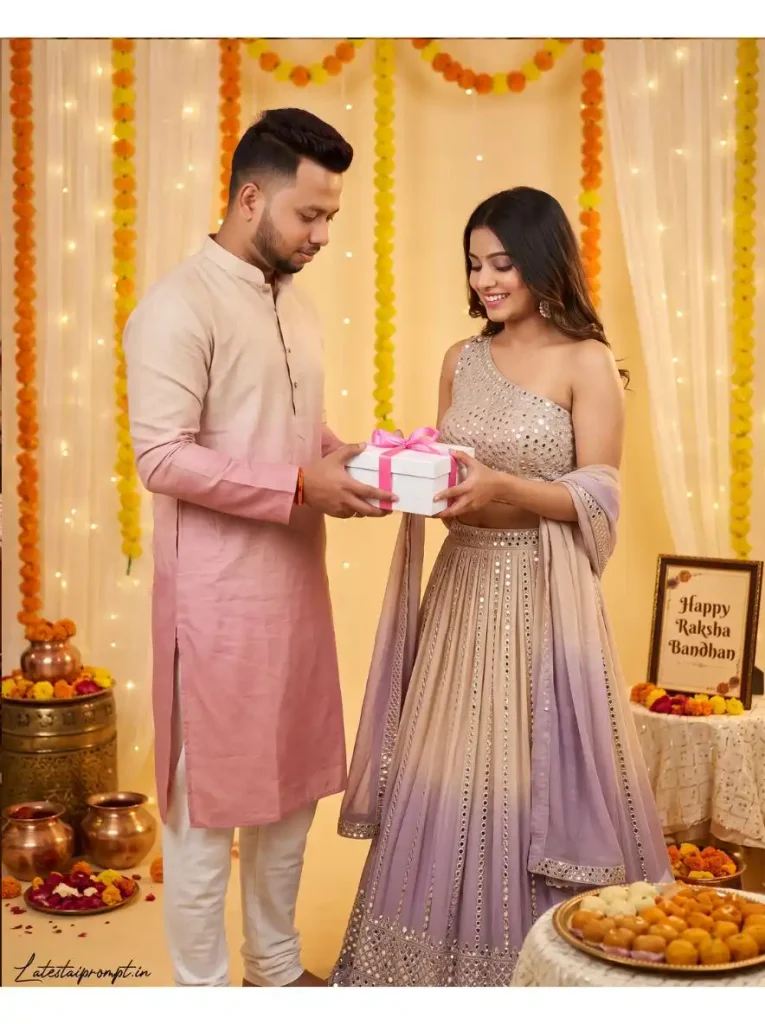
दोस्तों, हर Raksha Bandhan AI Photo Editing Prompts Collection में सिर्फ Rakhi बांधने वाला एक जैसा Scene हो तो Photos जल्दी Repetitive लगने लगती हैं। इसलिए इसमें भाई को अपनी बहन को Pink Ribbon वाला Gift देते हुए रखा है। मैंने देखा कि दोनों की Smile और Gift देते समय Hands Natural आएं तो यह Scene किसी Festival Photoshoot से ज्यादा Real लगता है।
A young handsome Indian man in a light beige-to-pink ombre kurta with white churidar, giving a white gift box with pink ribbon to his beautiful sister. The sister is wearing a glamorous one-shoulder beige-to-lavender ombre lehenga with silver mirror work and matching dupatta, smiling happily while receiving the gift. Background: Festive indoor setting with marigold and fairy light curtains, brass pots, flowers, thali of sweets, and a “Happy Raksha Bandhan” frame. Soft warm golden lighting, joyful sibling bond, highly detailed, photorealistic, professional photoshoot, Face same as reference image keep 8k Ultra HD face without any expression and changes. ASPECT RATIO: 4:5 vertical TEXT / SIGNATURE: Add “Latestaiprompt.in” bottom-left, handwritten signature-style, thin cursive strokes, small size, subtle premium elegance, white/soft off-white. negatives prompt: No Ai effect, no cartoonist effect, no face reshaping, no Ai color effect.
4. Cinematic Brother-Sister Rakhi Celebration AI Photo Prompt
अगर ज्यादा फूल, Gifts और भारी Decoration पसंद नहीं है, तो यह Raksha Bandhan Special AI Photo Editing Prompt अच्छा लगेगा। इसमें पूरा Focus बहन के Rakhi बांधने और दोनों के चेहरे पर रहता है। मेरे Test में 85mm Lens वाला Close Background Blur इस Scene पर अच्छा बैठा और Photo साफ-सुथरी रही।
A photorealistic 4K cinematic medium shot of an Indian brother and sister celebrating Raksha Bandhan. The brother has short styled black hair, a sharp jawline with a light beard, he wearing a tredistional Kurta, identical to the first reference image. The sister has her hair tied up, smiling beautifully with neat makeup and smooth radiant skin, wearing a traditional dark brown and gold silk saree with a red blouse, identical to the second reference image. She is tying a beautiful designer Rakhi on her brother’s wrist. The background is a high-resolution, softly blurred luxury festive room with warm bokeh lights and a clean neon sign reading “Happy Raksh Bandhan”. Hyper-realistic skin textures, smooth face features, maintaining exact facial structures, shot on 85mm lens, ultra-detailed 4K UHD. ASPECT RATIO: 4:5 vertical TEXT / SIGNATURE: Add “Latestaiprompt.in” bottom-left, handwritten signature-style, thin cursive strokes, small size, subtle premium elegance, white/soft off-white. negatives prompt: No Ai effect, no cartoonist effect, no face reshaping, no Ai color effect.
5. Cute Brother-Sister Surprise Gift Raksha Bandhan AI Photo Prompt
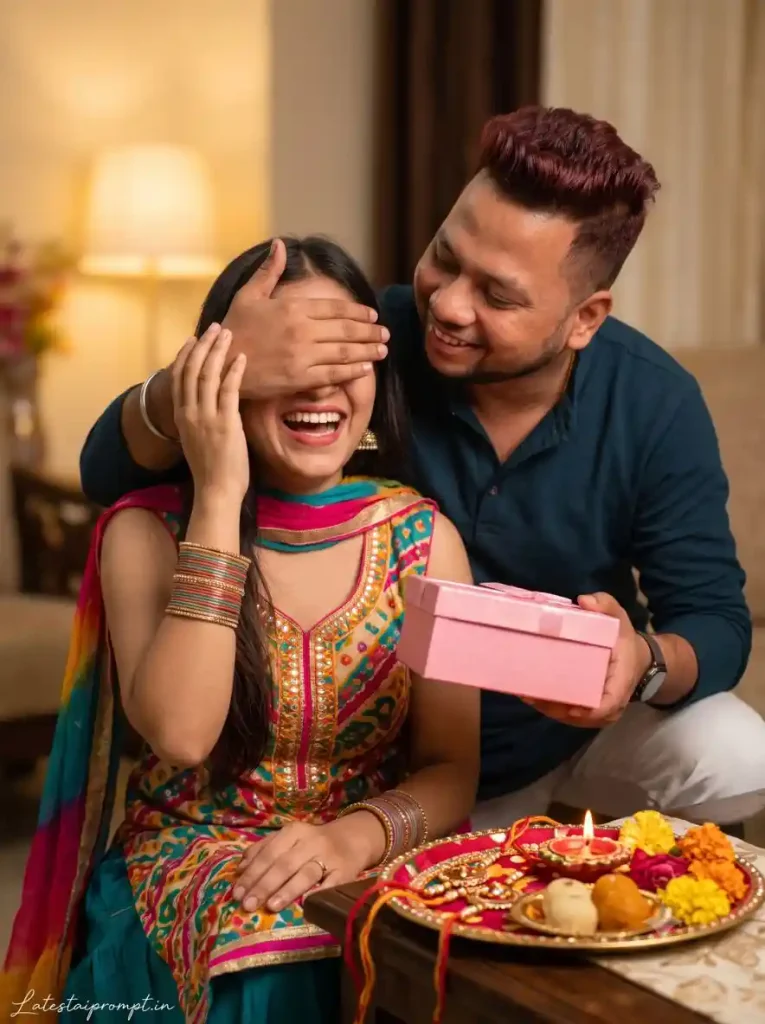
इन सभी Trending Raksha Bandhan AI Photo Editing Prompts में मुझे यह Concept सबसे मजेदार लगा। भाई एक हाथ से बहन की आंखें बंद करके Pink Gift Box से Surprise दे रहा है और बहन हंस रही है—यानी Typical Camera Pose के बजाय Photo में छोटी-सी Story भी दिखाई देती है।
इसे Test करते समय Hands पर ध्यान देना जरूरी लगा, क्योंकि एक ही Scene में आंखें Cover करना, Gift पकड़ना और दोनों Characters की Position AI के लिए थोड़ा मुश्किल हो सकता है। सही Generation मिलने पर इसका Candid Look काफी प्यारा आता है।
FACE LOCK – AUTHENTIC IDENTITY: Both uploaded reference photos must be used as the original identity reference. Keep the faces completely authentic with no AI reinterpretation or enhancement. Preserve the original facial structure, skin texture, hairstyle, age, expression, and overall appearance exactly as shown. Ensure a perfectly realistic, high-resolution human look. Create an ultra-realistic cinematic Raksha Bandhan portrait using the uploaded photo as the exact facial reference. Preserve the brother’s and sister’s natural facial identity, facial features, skin tone, hairstyle, and expressions accurately. Show a playful and emotional brother-sister moment, with the smiling brother affectionately covering his sister’s eyes with one hand while leaning toward her, and the sister laughing joyfully while brother holding a beautiful pink gift box like giving suprise to his sister. Dress the sister in a colorful traditional Indian outfit with a dupatta and bangles, and the brother in a stylish pastel-green traditional kurta. Add a decorated Raksha Bandhan thali with Rakhi, sweets, diya and flowers nearby. Warm indoor lighting, cozy home background, soft creamy bokeh, natural skin texture, candid emotion, DSLR photography, 85mm lens, f/1.8, cinematic color grading, photorealistic 8K quality. ASPECT RATIO: 3:4 vertical TEXT / SIGNATURE: Add “Latestaiprompt.in” bottom-left, handwritten signature-style, thin cursive strokes, small size, subtle premium elegance, white/soft off-white.
6. Stylish Brother-Sister Raksha Bandhan Special AI Photo Editing Prompt
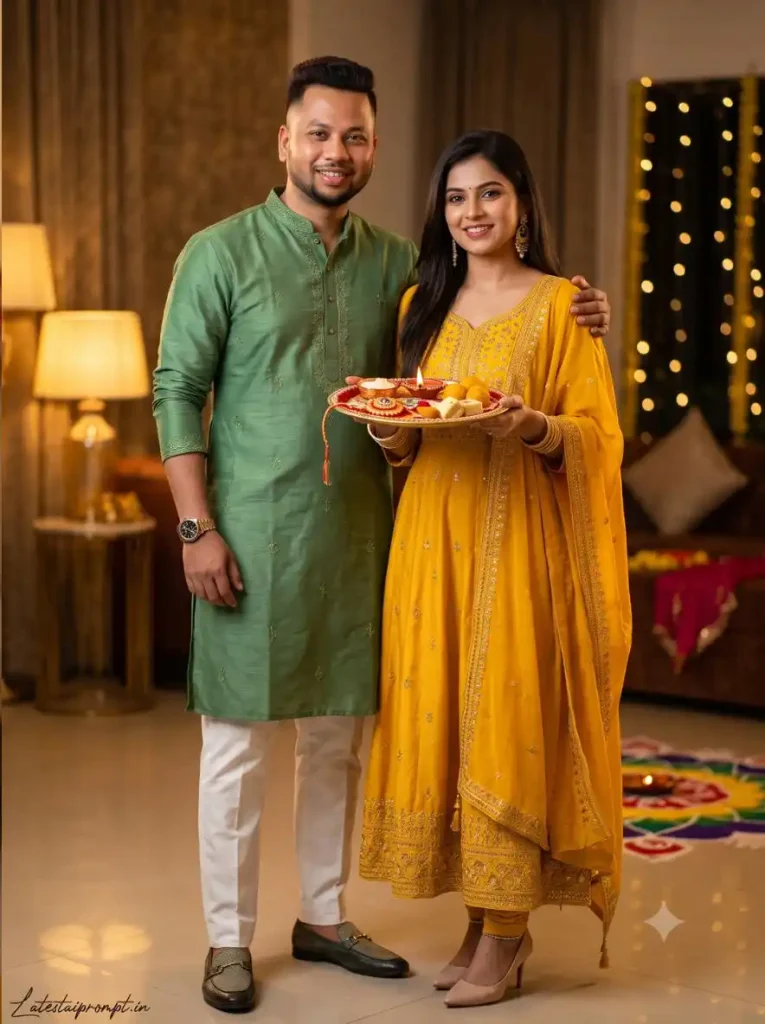
आखिरी Rakhi Celebration AI Photo Prompt उन लोगों के लिए है जिन्हें Rakhi बांधते हुए नहीं, बल्कि Ceremony के बाद की एक अच्छी Brother-Sister Photo चाहिए। भाई का बहन के Shoulder पर Arm और बहन के हाथ में सजी हुई Rakhi Thali Scene को Festive भी रखती है और Photo को एक Proper Portrait Look भी देती है।
मेरे Experience में इस तरह के Standing Portrait में Full या Medium-Full Reference Photos बेहतर रहती हैं। सिर्फ बहुत Close Face Photos देने पर AI Outfit और Body Proportion में अपनी तरफ से ज्यादा बदलाव कर सकता है।
FACE LOCK – ZERO IDENTITY DRIFT Use both uploaded reference photos (boy & girl) as the exact identity reference. The generated faces must remain a perfect 100% match to the originals with zero identity drift. Never alter facial shape, skin texture, hairstyle, age, expression, or unique facial details. No beautification, enhancement, or AI face redesign is permitted. Output must appear naturally human with ultra-HD facial clarity. Create an ultra-realistic cinematic Raksha Bandhan portrait using the uploaded photo as the exact facial reference. Preserve both siblings’ natural facial identity, facial features, skin tone, hairstyle, and expressions accurately. Show the stylish brother standing confidently with his arm around his sister, while the sister holds a beautifully decorated Raksha Bandhan thali. Both smile naturally toward the camera, expressing a strong and loving sibling bond. Dress the brother in a premium modern Green designer kurta with subtle embroidery, tailored white trousers, luxury watch and stylish loafers. Dress the sister in a fashionable royal-yellow embroidered Anarkali suit with a designer dupatta, elegant earrings, bangles and delicate heels. Add a beautiful Rakhi, diya, kumkum, rice and sweets on the thali. Elegant modern festive interior, warm golden lighting, luxury décor, soft background bokeh, natural skin texture, realistic fabric details, DSLR photography, 85mm lens, f/1.8, cinematic color grading, HDR, photorealistic 8K quality. ASPECT RATIO: 3:4 vertical TEXT / SIGNATURE: Add “Latestaiprompt.in” bottom-left, handwritten signature-style, thin cursive strokes, small size, subtle premium elegance, white/soft off-white.
Gemini या ChatGPT से Raksha Bandhan AI Photo कैसे बनाएं?
दोस्तों, Raksha Bandhan AI Photo Editing Prompts का Result काफी हद तक इस बात पर भी निर्भर करता है कि आप Reference Photos कैसे Upload करते हैं और Prompt किस तरह इस्तेमाल करते हैं। मैंने Gemini और ChatGPT दोनों में यही तरीका रखा है—Process आसान है और किसी अलग Editing App की जरूरत नहीं पड़ती।
+ (Plus) Icon पर Tap करके भाई और बहन की साफ, High-Quality Reference Photos Upload करें।
ऊपर दिए गए Trending Raksha Bandhan AI Photo Editing Prompts में से पसंदीदा Prompt पूरा Copy करें।
Photo के साथ Prompt Paste करके Generate/Submit करें और Image तैयार होने दें।
Result आने पर Face, Hands, Rakhi की Position और Expressions को Original Photos से Match करके देखें।
पहली Generation Perfect न हो तो Prompt में तुरंत बदलाव न करें। उसी Prompt से एक और Image Generate करके दोनों Results Compare करें।
मेरे Experience में एक ही Raksha Bandhan Special AI Photo Editing Prompt को Gemini और ChatGPT दोनों में Try करना भी अच्छा तरीका है। कई बार एक Tool में Face ज्यादा Natural मिलता है तो दूसरे में कपड़े, Lighting और Rakhi Decoration बेहतर बनती है—Final में वही Image रखें जिसमें भाई-बहन की पहचान और उनका Moment दोनों सबसे Natural लगें।
Gemini vs ChatGPT: Raksha Bandhan Photo में किसने दिया ज्यादा Real Result?
मैंने एक ही Raksha Bandhan AI Photo Editing Prompt और वही Brother-Sister Reference Photos दोनों Tools में Try कीं। मेरे Test में Gemini ने कई बार दोनों Faces को ज्यादा Natural रखा और भाई-बहन की Skin Tone तथा Expressions भी Original Photos के करीब मिले। Multiple reference images को साथ इस्तेमाल करना Gemini की मौजूदा image-generation capabilities का भी हिस्सा है।
वहीं ChatGPT में मुझे Festive Background, कपड़ों की छोटी Details, Lighting और Prompt की Overall Composition पर अच्छा Control मिला, ChatGPT Images uploaded photos को edit/reference के रूप में इस्तेमाल करने और appearance जैसी details को edits में consistent रखने के लिए बनाया गया है। मेरे हिसाब से पहले Gemini में Face-focused Result निकालें और एक बार वही Prompt ChatGPT में भी Generate करें—फिर जिस Image में Face और Rakhi Moment दोनों ज्यादा असली लगें, उसे Final रखें
बेहतर Result चाहिए तो इन छोटी गलतियों को नजरअंदाज न करें
दोस्तों, Raksha Bandhan AI Photo Editing Prompts में अच्छा Result सिर्फ Prompt पर निर्भर नहीं करता। मैंने अलग-अलग Reference Photos के साथ Generate करके देखा तो साफ और Natural Photo में भाई-बहन के Faces ज्यादा सही बने, जबकि ज्यादा Filter, Blur या Side Angle वाली Photo में Face थोड़ा बदलने लगा। इसलिए ऐसी Photo Upload करें जिसमें दोनों के चेहरे और Hairstyle साफ दिखाई दें।
Final Image बन जाए तो उसे एक बार Zoom करके जरूर देखें। खासकर Rakhi किस कलाई पर है, Fingers सही बनी हैं या नहीं, Puja Thali के Items और Hindi Text Check करें। मेरे Test में Trending Raksha Bandhan AI Photo Editing Prompts के Results में Face सही होने के बाद भी छोटी गलतियां ज्यादातर इन्हीं जगहों पर मिलीं। 30 सेकंड की यह Checking अच्छी Photo और सच में Share करने लायक Photo के बीच बड़ा फर्क कर सकती है।
एक ही Prompt से हर बार Same Result क्यों नहीं आता?
दोस्तों, मैंने Raksha Bandhan AI Photo Editing Prompts को एक ही Reference Photo के साथ दोबारा Generate करके देखा, और दोनों बार Result में थोड़ा फर्क था। एक Image में Faces ज्यादा Natural आए, जबकि दूसरी में Rakhi Ceremony और Background बेहतर बना। यानी पहली Generation को ही Final मान लेना जरूरी नहीं है।
अगर Trending Raksha Bandhan AI Photo Editing Prompts इस्तेमाल करते समय पहली Photo उम्मीद जैसी न बने, तो Prompt में तुरंत बदलाव करने के बजाय उसी Prompt से 2–3 Results Generate करके Compare करें। मेरे Experience में कई बार बिना कुछ बदले अगली Generation में Face, Hands और Expressions पहले से काफी बेहतर मिल जाते हैं।
अक्सर पूछे जाने वाले सवाल (FAQs)
1. Raksha Bandhan AI Photo Editing Prompts से अपना असली Face कैसे रखें?
साफ और बिना Filter वाली Reference Photo Upload करें, जिसमें चेहरा और Hairstyle अच्छी तरह दिखाई दें। Face Lock वाला Prompt पूरा इस्तेमाल करें।
2. Raksha Bandhan AI Photo बनाने के लिए Gemini या ChatGPT कौन बेहतर है?
मेरे Test में Gemini में Faces कई बार ज्यादा Natural मिले, जबकि ChatGPT में Outfit, Lighting और Festive Details अच्छे आए। बेहतर है Same Prompt दोनों में एक बार Try करें।
3. क्या एक साथ भाई और बहन की अलग-अलग Photos Upload कर सकते हैं?
हाँ। Brother Sister Raksha Bandhan AI Photo Prompt के साथ दोनों की अलग Reference Photos Upload की जा सकती हैं। बस दोनों Photos साफ और High Quality रखें।
4. AI Photo में Face बार-बार बदल रहा हो तो क्या करें?
सबसे पहले Reference Photo बदलकर देखें। Front या हल्के Side Angle वाली साफ Photo अक्सर बेहतर रहती है; Prompt में Face Lock Instructions को हटाएं नहीं।
5. Rakhi या Fingers गलत बन जाएं तो पूरा Prompt बदलना जरूरी है?
नहीं। उसी Raksha Bandhan AI Photo Editing Prompt से एक-दो बार दोबारा Generate करें। कई बार अगली Generation में Hands और Rakhi Placement अपने आप बेहतर मिल जाती है।
निष्कर्ष
Raksha Bandhan की अच्छी Photo वही है जिसे कुछ समय बाद दोबारा देखें तो सिर्फ Decoration नहीं, उस Moment की याद भी आए। इसलिए मैंने इन Raksha Bandhan AI Photo Editing Prompts में अलग-अलग कपड़े देने से ज्यादा भाई-बहन के अलग Moments पर ध्यान रखा है।
उम्मीद है दोस्तों, इनमें से कोई Beautiful Raksha Bandhan AI Photo Prompt आपकी इस Rakhi की पसंदीदा Photo बनाने में काम आएगा। आप कौन-सा Prompt Try करने वाले हैं, Comment में जरूर बताना। और अगर आपके भाई, बहन या दोस्तों को भी ऐसी Photos बनाना पसंद है, तो उनके साथ यह लेख Share कर देना।
नमस्कार! मेरा नाम लवित राव है। मैं Latest AI Prompts, Gemini AI, ChatGPT और Trending AI Image Editing Prompts पर काम करता हूँ। इस वेबसाइट पर मैं केवल वही प्रॉम्प्ट्स और गाइड्स शेयर करता हूँ जिन्हें मैं खुद टेस्ट करता हूँ, ताकि आपको सही, उपयोगी और आसानी से समझ आने वाली जानकारी मिल सके।