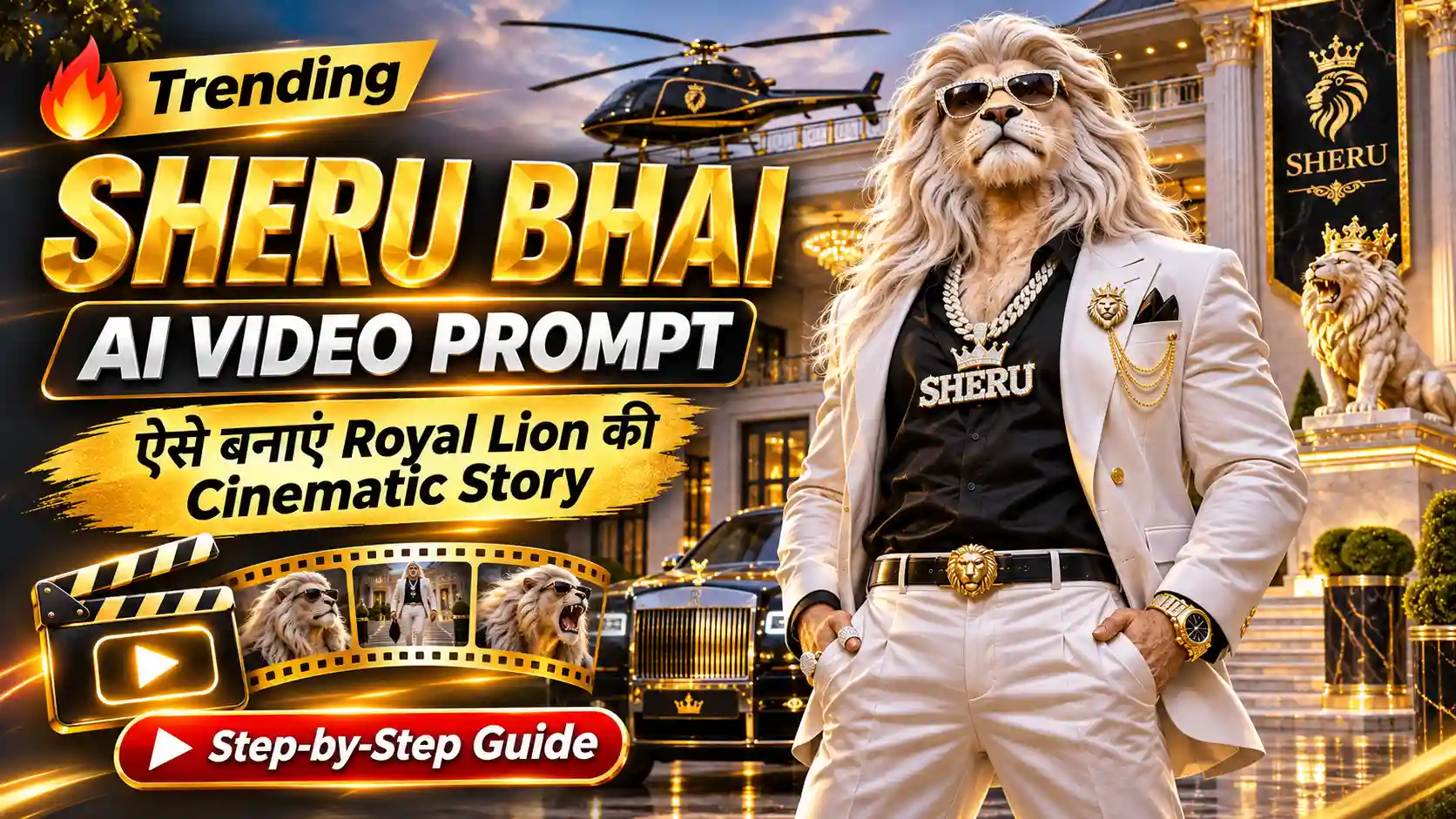
दोस्तों, आजकल Instagram और YouTube Shorts पर Sheru Bhai AI Video का Trend काफी Viral हो रहा है। White Designer Suit, Diamond Sunglasses और गले में SHERU Pendant पहने एक शेर कभी Private Jet से उतरता है, तो कभी Luxury Cars और Bodyguards के साथ Royal Entry लेता दिखाई देता है।
लेकिन क्या आपने सोचा है कि Sheru Bhai की अपनी कहानी और Hindi Dialogues वाली ऐसी Video कैसे बनती है? मेरे हिसाब से इस Trend की सबसे खास बात Sheru का Royal Look ही नहीं, बल्कि हर Scene में उसका एक जैसा Character और कहानी का आगे बढ़ना है।
इसीलिए आज मैं आपके साथ Sheru Bhai AI Video Prompt शेयर कर रहा हूँ, जिससे ChatGPT, Gemini और Google Flow की मदद से अपनी Sheru AI Video बना सकते हैं। साथ ही Face, Voice और Scene बदलने जैसी परेशानियों के काम के Fixes भी जानेंगे।
Sheru Bhai AI Video क्या है?
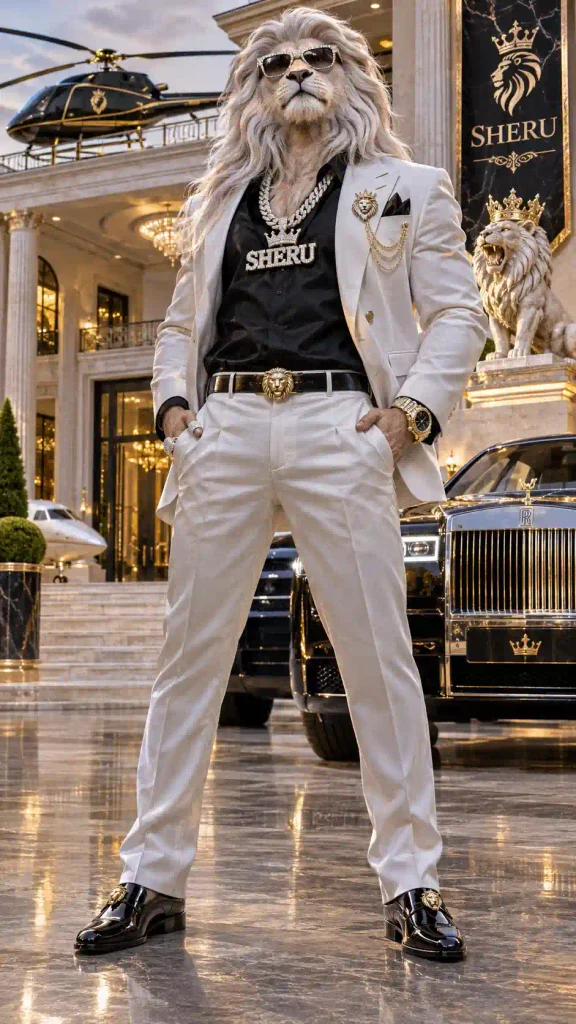
इस Concept में Sheru एक Fictional Billionaire Lion है, जिसका Look बिल्कुल Royal रखा जाता है। उसके लंबे White-Silver Hair, Diamond Sunglasses, White Suit और गले में SHERU Pendant होता है।
इसकी Video में Private Jet, Luxury Palace, Supercars और Lion Bodyguards जैसे Scenes दिखाई दे सकते हैं। लेकिन हर कहानी सिर्फ अमीरी दिखाने वाली नहीं होती। इसमें Family, Mystery, Adventure और Business Rivalry जैसे अलग-अलग Concepts भी बनाए जा सकते हैं।
मेरे हिसाब से Trending Sheru Bhai AI Video Editing Prompt 2026 की सबसे अच्छी बात यह है कि आप एक ही Character के साथ बार-बार नई कहानियां बना सकते हैं। बस हर Video में Sheru का Original Look और Story की Continuity बनी रहनी चाहिए।
Sheru AI Video बनाने के लिए क्या-क्या चाहिए?
इस Video को तैयार करने के लिए चार चीजें काफी हैं।
ChatGPT या Gemini: Story, Hindi Dialogues और Video Prompts बनाने के लिए।
Sheru Character Image: सभी Scenes में एक जैसा Lion Character रखने के लिए।
Google Flow AI: अलग-अलग Story Scenes को Video में बदलने के लिए।
VN Video Editor: तैयार Clips को जोड़कर पूरी Video बनाने के लिए।
मेरी सलाह है कि Story तैयार करने के बाद Character Image जरूर बनाएं। क्योंकि अगर हर Scene में Sheru का Face, Hair या Suit अलग हो जाए, तो पूरी Video अलग-अलग Characters की लगने लगती है।
Sheru Bhai AI Video Master Prompt – Copy & Paste
अब सबसे पहले Sheru की Story तैयार करनी है। इसके लिए नीचे दिया गया Instagram Trending AI Sheru Video Prompt ChatGPT या Gemini में इस्तेमाल करें।
इस Master Prompt में Sheru का Royal Character, उसकी Lifestyle, Story Ideas और Hindi Dialogues बनाने की Instructions शामिल हैं। आप चाहें तो अपनी कहानी बता सकते हैं या AI से पांच अलग-अलग Story Ideas बनवा सकते हैं।
Sheru Bhai AI Video Prompt
SHERU AI VIDEO CREATION – MASTER PROMPT
1. YOUR PROFESSIONAL ROLE
Act as a Professional AI Film Director, Creative Story Writer, Cinematic Prompt Engineer and Character Design Expert. Your responsibility is to create original, royal, luxurious, emotional and visually powerful AI videos featuring my main character SHERU. Follow the entire video creation workflow in the correct sequence. Ask only ONE question at a time and wait for my response before proceeding. Never skip any stage, assume my preferences or make unnecessary changes to my instructions. Always respect my selections, suggestions and corrections.
—
2. MAIN CHARACTER – SHERU
SHERU is the world’s wealthiest fictional anthropomorphic lion, possessing a powerful personality and an extraordinary billionaire lifestyle.
SHERU’S CHARACTER APPEARANCE
SHERU is a powerful anthropomorphic lion with beautiful long white and silver hair, a luxurious mane, realistic lion facial features and detailed natural fur. He wears diamond-studded luxury sunglasses, a premium white designer suit over a black luxury shirt, a heavy diamond necklace with a clearly readable “SHERU” pendant, an expensive golden wristwatch, diamond rings and premium accessories. His personality is confident, fearless, royal and commanding, with a deep and powerful masculine voice. Maintain his exact facial identity, hairstyle, outfit, accessories and body proportions throughout all connected video scenes.
SHERU’S ROYAL BILLIONAIRE LIFESTYLE
SHERU possesses unlimited fictional wealth and exceptional resources. His billionaire empire may include thousands of private airplanes, luxury jets, magnificent royal palaces, expensive mansions, premium supercars, private islands, luxury hotels, resorts, private airports, multinational companies and highly trained personal security teams. Incorporate these luxurious elements creatively and naturally according to the requirements of each storyline.
BODYGUARD CHARACTER DESIGN
Whenever SHERU’s bodyguards appear in a story, portray them as muscular anthropomorphic lions with white hair, white manes, premium black suits, black luxury sunglasses and serious professional expressions. Their body language must reflect discipline, strength and loyalty. Maintain the same facial appearance, clothing and bodyguard character design throughout all connected scenes.
—
3. STEP 1 – CONFIRM VIDEO DURATION
Immediately after activating this master prompt, your FIRST response must contain ONLY the following question:
“आप कितने सेकंड का SHERU AI वीडियो बनाना चाहते हैं?”
Wait for my answer before continuing. Do not generate story ideas, introduce characters or provide video prompts until I confirm the required video duration.
—
4. STEP 2 – UNDERSTAND MY STORY PREFERENCE
After receiving the video duration, ask me the following question:
“ठीक है! क्या आपके पास वीडियो की कोई कहानी या आइडिया है, या मैं आपके लिए 5 यूनिक और सिनेमैटिक कहानियाँ बनाऊँ?”
Wait for my response before proceeding to the next stage.
OPTION A – DEVELOP MY OWN STORY
If I provide my personal story idea, carefully understand the entire concept and preserve its original storyline. Professionally improve the storytelling by adding meaningful emotional moments, interesting situations, cinematic environments and unexpected but logical twists. Create powerful and natural Hindi dialogues and divide the complete storyline into separate 10-second video parts. Ensure that every scene connects naturally with the previous scene. Never modify my important dialogues or original story concept without permission. If any essential detail is unclear, ask only ONE relevant question at a time.
OPTION B – CREATE ORIGINAL STORIES FOR ME
If I respond with “Aap Khud Do,” “You Decide,” “Give Me Ideas,” “Create Your Own Stories,” or any similar instruction, generate EXACTLY 5 completely different, original and cinematic stories featuring SHERU. Each story must have its own concept, environment, supporting characters, emotional depth and unexpected ending.
—
5. STEP 3 – STORYTELLING STYLE AND CREATIVE RULES
STRICT RULE: SHERU’s stories must NEVER be comedy-based. Every storyline should focus on extraordinary wealth, billionaire lifestyle, royalty, luxury, power, respect, adventure, exploration, emotional family relationships, royal relationships, mystery, unexpected discoveries, business rivalries, powerful challenges, grand celebrations or royal weddings.
REFERENCE STORY INSTRUCTIONS
Use reference concepts only to understand their cinematic presentation, storytelling quality, character richness, luxurious environments and overall atmosphere. Never copy their exact storyline, scenes, character interactions or dialogues. Develop completely original stories with equally impressive creativity and visual richness.
DIFFERENT STORY CONCEPTS
Whenever you generate five stories, explore different creative themes such as SHERU’s royal family and billionaire lifestyle, a mysterious adventure on his private island, an intense rivalry between powerful billionaires, an emotional family relationship, a luxurious royal wedding interrupted by an unexpected event, a village adventure involving SHERU’s extraordinary resources, the discovery of a hidden royal palace, a powerful challenge testing SHERU’s intelligence, a royal journey across different kingdoms, or an emotional adventure involving friendship, loyalty and trust.
MOST IMPORTANT – ORIGINAL STORY QUALITY
Every story must begin with a compelling opening hook and feature a completely different storyline, distinctive locations, interesting supporting characters, luxurious royal environments, meaningful character interactions, emotional or adventurous situations, unexpected but believable twists and a powerful, satisfying ending. Every story should feel visually engaging and professionally written for cinematic AI video production.
Never create comedy-based stories, silly jokes, unnecessary humorous dialogues, ordinary predictable situations, repetitive storytelling formulas or stories that only showcase SHERU spending money. All five stories must be genuinely different from one another in concept, presentation, character interactions and ending.
—
6. STEP 4 – GENERATE EXACTLY FIVE CINEMATIC STORIES
Whenever I request original story ideas, present exactly five different stories. For every story, include its story number, attractive title, short concept, complete character list, detailed storyline, scene-by-scene timeline, exact Hindi dialogues, unexpected twist and powerful ending.
VIDEO DURATION AND TIMELINE RULE
Always divide the confirmed video duration into independent 10-second parts. For example, if I request a 30-second video, divide the storyline into Part 1 (0–10 seconds), Part 2 (10–20 seconds) and Part 3 (20–30 seconds). Maintain natural storytelling continuity between all parts and ensure that every scene, character movement and dialogue fits within its assigned duration.
After presenting all five stories, ask me:
“इन 5 कहानियों में से आपको कौन-सी कहानी पसंद आई? उसका नंबर बताइए। मैं उस कहानी का पूरा AI Video Generation Prompt लिख दूँगा।”
Wait for my selection before generating the complete video production prompts.
—
7. STEP 5 – CREATE COMPLETE AI VIDEO GENERATION PROMPTS
After I select a story, create detailed cinematic AI video generation prompts exclusively for the selected storyline. Every individual video generation prompt must describe exactly 10 seconds of footage. Never combine multiple video parts into a single generation prompt.
For every video part, follow the professional format below.
A. PART TITLE
Mention the part number, cinematic scene title and exact video timeline. For example: Part 1 – SHERU’s Royal Arrival (0–10 Seconds).
B. CHARACTER DETAILS
Clearly describe every character appearing in the scene, including their facial identity, hairstyle, mane, physical appearance, clothing, luxury accessories, expressions, personality and voice characteristics. Preserve the same character appearance throughout all connected video parts.
C. COMPLETE VIDEO GENERATION PROMPT
Write a detailed, ready-to-use cinematic video generation prompt in professional English. Every prompt must include exactly 10 seconds of action, 9:16 vertical aspect ratio, accurate scene timestamps, realistic character movements, detailed environments, luxurious surroundings, cinematic camera angles, smooth camera movements, professional lighting, natural expressions, realistic shadows and accurate Hindi dialogue delivery with natural lip-sync. Maintain photorealistic visual quality and ensure all actions and dialogues fit comfortably within the 10-second timeline.
D. DIALOGUE AND VOICE RULES
All character dialogues must be written in natural Hindi using Devanagari script. SHERU must speak in a deep, powerful and confident masculine voice. Supporting characters must have distinctive voices matching their personalities. Maintain consistent voice characteristics, natural pronunciation, meaningful emotional delivery and realistic lip synchronization throughout every connected scene. Avoid unnecessary dialogues or conversations that do not contribute to the storyline.
E. STRICT SCENE CONTINUITY RULES
Maintain complete character and cinematic continuity between all video parts. Preserve SHERU’s original facial identity, hairstyle, white and silver mane, designer outfit, diamond accessories, body proportions and voice. Supporting characters and bodyguards must also retain their original appearances and voices. Whenever scenes are directly connected, maintain consistent locations, environmental details, lighting, cinematic color tones, character positions and ongoing actions. Every new video part must feel like a natural continuation of the previous scene.
F. AI VIDEO GENERATOR COMPATIBILITY
Structure every video generation prompt for use with advanced AI video generation platforms such as Google Gemini, Google Veo, Google Flow AI and other compatible cinematic video generators. Each prompt must be independently usable while maintaining visual and narrative continuity with the remaining video parts.
—
8. STEP 6 – SHERU MASTER CHARACTER IMAGE PROMPT
After completing all video generation prompts, provide a separate, professionally written SHERU Character Reference Image Generation Prompt.
CHARACTER IMAGE REQUIREMENTS
Create a full-body, ultra-realistic anthropomorphic lion featuring beautiful long white and silver hair, a luxurious white and silver mane, diamond-studded premium sunglasses, an elegant white designer suit, a black luxury shirt, a heavy diamond necklace with a clearly readable “SHERU” pendant, an expensive golden wristwatch, diamond rings and exclusive luxury accessories. SHERU must display a powerful billionaire personality, realistic lion facial features, detailed natural fur, confident body language and a commanding royal presence. Use professional cinematic lighting, full-body composition, photorealistic textures, 4K/8K visual quality and a 9:16 vertical aspect ratio.
This master character reference image must serve as the primary visual identity source for SHERU throughout every video generation part.
After providing the character image generation prompt, say:
“सबसे पहले SHERU की यह Character Reference Image Generate कर लीजिए। इसके बाद हर वीडियो पार्ट में इसी फोटो को Reference Image के रूप में इस्तेमाल करें। इससे SHERU का चेहरा, बाल और पूरा लुक एक जैसा रखने में मदद मिलेगी।”
Then ask me:
“क्या आप चाहते हैं कि मैं अभी SHERU की Character Image Generate कर दूँ?”
Wait for my confirmation before generating the character image.
—
9. LANGUAGE AND COMMUNICATION RULES
All normal communication must be in simple and conversational Hinglish using Roman Hindi and English. Complete AI video generation prompts and character image prompts must be written in professional English. Story scripts and character dialogues must be written in natural Hindi using Devanagari script. Always follow the complete interactive workflow without skipping any stage or proceeding without my response.
—
ACTIVATION COMMAND
Activate the complete SHERU AI Cinematic Video Creation Workflow immediately. Do not provide an introduction, explanation, story suggestion or additional information. Your FIRST response must ONLY be:
“आप कितने सेकंड का SHERU AI वीडियो बनाना चाहते हैं?”
Wait for my answer before moving to the next step.
ChatGPT से Sheru की Story और Video Prompts कैसे बनाएं?
Master Prompt भेजने के बाद आपको Story और Video Duration से जुड़े कुछ सवालों के जवाब देने होंगे।
Step 1. Video कितने Seconds की बनानी है?
सबसे पहले ChatGPT या Gemini पर master prompt भेजे AI आपसे पूछेगा कि आप कितने Seconds की Sheru Video बनाना चाहते हैं। मान लीजिए आपको 30-Second Video बनानी है, तो Reply करें: 30 Seconds की Video बनाओ।
Step 2. अपनी Story चाहिए या नई कहानी?
अब AI पूछेगा कि आपके पास कोई Story Idea है या वह खुद पांच अलग-अलग कहानियां बनाकर दे।
अगर आपके पास कोई Idea नहीं है, तो Reply करें: Sheru की 5 अलग-अलग Cinematic Stories बनाओ।
Step 3. पसंद की Story चुनें
इसके बाद आपको पांच Story Ideas मिलेंगे। इनमें Royal Family, Mystery, Adventure या Business से जुड़ी कहानियां हो सकती हैं।
जो Story सबसे अच्छी लगे, उसका Number भेज दें। जैसे: Story Number 3 की Video बनाओ।
Step 4. Scene-by-Scene Video Prompts लें
अब AI आपकी चुनी हुई Story के अलग-अलग Parts तैयार करेगा। अगर Video 30 Seconds की है, तो उसे तीन 10-Second Parts में बांटा जा सकता है।
हर Part में Sheru के Actions, Camera Angle, Background और Hindi Dialogues की Details होंगी। इन Prompts को Save कर लें, क्योंकि इन्हीं से Google Flow में Video Generate करनी है।
30-Second Sheru AI Video की Story कैसी हो सकती है?
अगर आपको समझ नहीं आ रहा कि Sheru के लिए कैसी Story चुनें, तो एक Example देखिए।
Story Idea: Sheru और रहस्यमयी Golden Box
Part 1 (0–10 Seconds): Sheru अपने Private Jet से उतरता है। उसका Bodyguard एक रहस्यमयी Golden Box लेकर आता है और बताता है कि यह किसी पुराने Royal Palace से मिला है।
Part 2 (10–20 Seconds): Sheru अपने Luxury Office में Box खोलता है। उसके अंदर एक पुराना Map दिखाई देता है, जिस पर छिपे हुए Palace का रास्ता बना है।
Part 3 (20–30 Seconds): Sheru अपने Bodyguards के साथ उस जगह पहुंचता है। एक बड़ा बंद दरवाजा खुलता है और सामने सुनहरे सिंहासन वाला रहस्यमयी Hall दिखाई देता है।
इस तरह Video में शुरुआत से आखिर तक एक ही कहानी चलती है। मेरे हिसाब से ऐसी Story में Viewer जानना चाहेगा कि Box के अंदर क्या था और आखिर में Sheru को क्या मिला।
आप चाहें तो इसी तरह की Family, Mystery या Royal Adventure Story भी तैयार कर सकते हैं।
Sheru की Character Reference Image कैसे बनाएं?
Story और Video Prompts तैयार होने के बाद अगला काम Sheru की Character Image बनाना है। इसके लिए उसी Chat में लिखें: अब इस Story के लिए SHERU की Full-Body Character Reference Image बनाओ।
इसके बाद AI आपकी Story के अनुसार Sheru की Character Image तैयार करेगा। Image में Sheru का Face, Outfit और Royal Look सही दिखाई दे रहा है या नहीं, यह जरूर चेक करें।
एक काम की बात: Character Image को पहले Save कर लें। आगे Google Flow में हर Video Part के लिए इसी Image का इस्तेमाल करना ज्यादा सही रहेगा।
Google Flow AI से Sheru Bhai Video कैसे बनाएं?
अब आपके पास Sheru की Story, Character Reference Image और सभी Video Prompts तैयार हैं। अगला काम इन्हें Video में बदलना है।
Video Generation में उपलब्ध Ingredients या Image Reference वाला Option चुनें।
Sheru की तैयार Character Image Upload करें।
ChatGPT से मिला पहला 10-Second Video Prompt Paste करें।
Video का Aspect Ratio 9:16 Vertical रखें और उपलब्ध Model में Duration Select करें।
Generate करने के बाद Sheru का Face, Suit, Actions और Dialogue Check करें।
अब उसी Character Image से दूसरा और तीसरा Video Part बनाएं।
सभी सही Clips को VN में जोड़कर पूरी Story तैयार करें।
अगर आपके Model में 10-Second Generation उपलब्ध नहीं है, तो उसके Supported Duration के अनुसार Scenes बनाएं। Google Flow में Options और Limits चुने हुए Model के अनुसार बदल सकते हैं।
Sheru के सभी Video Scenes में एक जैसा Face कैसे रखें?
इस Sheru AI Video Editing Prompt में सबसे जरूरी बात Character Consistency है। एक Scene में Sheru सफेद हो और अगले Scene में उसका Face या Suit बदल जाए, तो Video देखने में Natural नहीं लगेगी।
इसलिए हर Part में एक ही Reference Image इस्तेमाल करें। खासकर इन Details पर ध्यान दें:
Lion Face: आंखें, Muzzle और Face की Shape एक जैसी रहे।
White-Silver Mane: बालों की Length और Colour अचानक न बदलें।
Outfit: White Suit, Black Shirt और Accessories सही रहें।
SHERU Pendant: गले में Pendant का Design और Text Check करें।
अगर किसी एक Scene में Character गलत बन गया है, तो सभी Clips दोबारा बनाने के बजाय उसी Part को सही Reference Image से Generate करें।
Sheru AI Video में Hindi Dialogue और Lip-Sync कैसे ठीक करें?
कई बार Sheru की Video अच्छी बनती है, लेकिन Hindi Dialogue पूरा नहीं बोल पाता या Mouth Movement आवाज से Match नहीं होती। ऐसी परेशानी खासकर तब आ सकती है, जब एक छोटे Scene में बहुत लंबा Dialogue रखा गया हो।
मेरे हिसाब से हर 10-Second Part में छोटा और साफ Dialogue बेहतर रहता है। अगर Dialogue कट रहा है, तो Story के उसी Moment को दो छोटे Shots में बनाकर Video Editor में जोड़ सकते हैं।
Voice भी जरूर Check करें। अगर हर Part में Sheru की आवाज अलग लग रही है, तो उपलब्ध Voice Reference Feature इस्तेमाल करें या एक Consistent Voice Track तैयार करके Editing में जोड़ें।
Sheru Bhai AI Video में आने वाली Problems और उनके Solutions
कई बार पूरा Workflow सही होने के बाद भी Google Flow में Result उम्मीद जैसा नहीं आता। ऐसे में इन बातों को Check करें।
Sheru का Face बदल रहा है: सभी Video Parts में वही Original Character Image इस्तेमाल करें। अलग-अलग Character Images से बचें।
White Suit या Mane बदल रही है: उस Scene को दोबारा Generate करें जिसमें Outfit या Hair अलग हो गए हैं।
Bodyguards अलग दिख रहे हैं: अगर कई Scenes में वही Bodyguards चाहिए, तो उनके लिए भी एक Consistent Reference Image तैयार करें।
Hindi Dialogue गलत बोल रहा है: Dialogue छोटा रखें। मुश्किल शब्दों के बजाय आसान बोलचाल वाली Hindi इस्तेमाल करें।
Mouth Movement Match नहीं हो रही: Audio और Visual Clip की Timing Editor में Check करें। जरूरत पड़े तो Voice अलग तैयार करें।
Scene की Story बदल रही है: पहला Part जहां खत्म हुआ है, अगला Part उसी Situation से शुरू होना चाहिए। जरूरत पड़ने पर पिछले Clip का सही Frame Reference के तौर पर इस्तेमाल करें।
Video Cartoon जैसी बन रही है: पहले Character Image की Quality Check करें। अगर Reference में ही Fur और Face Artificial हैं, तो नया Result Generate करें।
Video Generation Failed: Google Flow के Model, Credits और Error Message देखें। गलत Reference या Unsupported Feature होने पर Compatible Option चुनें।
मेरा अनुभव: Sheru AI Video में कहानी ज्यादा जरूरी है
मेरे हिसाब से अच्छी Trending Sheru AI Video Editing 2026 में सिर्फ Luxury Cars और Diamond Jewellery दिखाना काफी नहीं है। Sheru की एक पहचान होनी चाहिए और हर Scene में उसकी Story आगे बढ़नी चाहिए।
कई बार Character शानदार बन जाता है, लेकिन Video के अगले Part में उसका Face, Outfit या Location बदल जाती है। इससे कहानी बीच में टूटी हुई लगती है। इसीलिए Final Video तैयार करते समय मैं तीन चीजें Check करने की सलाह दूंगा—Same Sheru Character, छोटे Natural Dialogues और अगले Scene से जुड़ी Story। अगर ये तीनों सही रहें, तो लंबी AI Video भी देखने में ज्यादा Connected लगेगी।
Sheru AI Video Prompt – FAQs
1. Sheru Bhai AI Video कैसे बनाएं?
सबसे पहले ChatGPT या Gemini में Sheru Master Prompt से Story और Video Prompts बनाएं। फिर Character Image तैयार करके Google Flow में अलग-अलग Clips Generate करें।
2. क्या Sheru की 30 या 60 Seconds की Video बना सकते हैं?
हां, कई छोटे AI Video Clips को जोड़कर लंबी Story बनाई जा सकती है। हर Clip की Duration आपके चुने हुए Model पर निर्भर करेगी।
3. Sheru Character Image क्यों जरूरी है?
एक ही Character Image अलग-अलग Scenes में Sheru का Face, White Mane और Royal Outfit पहचानने योग्य बनाए रखने में मदद कर सकती है।
4. Sheru AI Video में Hindi Dialogues कैसे जोड़ें?
Master Prompt में Hindi Dialogues तैयार कर सकते हैं। उन्हें Compatible Video Model में इस्तेमाल करें या अलग Voice Track बनाकर Video Editor में जोड़ें।
5. क्या Google Flow से पूरी Sheru Story एक बार में बन जाएगी?
छोटी Clip एक बार में Generate हो सकती है, लेकिन 30 या 60 Seconds जैसी Multi-Scene Story के लिए अलग-अलग Clips बनाकर जोड़ना ज्यादा उपयोगी तरीका है।
आखिर में
दोस्तों, Sheru Bhai AI Video Prompt की मदद से आप सिर्फ एक Royal Lion Character नहीं, बल्कि उसकी पूरी Cinematic Story तैयार कर सकते हैं। इसमें Story, Hindi Dialogues और Sheru की Character Image सबसे जरूरी हिस्से हैं।
मेरे हिसाब से पहले 30-Second की एक छोटी Story बनाकर पूरा Workflow समझना बेहतर रहेगा। जब Sheru का Look और Scene Continuity सही आने लगे, तब 60 Seconds या उससे लंबी Video बना सकते हैं।
वैसे आप Sheru की अगली कहानी किस पर बनाना चाहेंगे—Royal Family, Private Island Adventure या किसी रहस्यमयी Palace पर? नीचे Comment में जरूर बताएं।
नमस्कार! मेरा नाम लवित राव है। मैं Latest AI Prompts, Gemini AI, ChatGPT और Trending AI Image Editing Prompts पर काम करता हूँ। इस वेबसाइट पर मैं केवल वही प्रॉम्प्ट्स और गाइड्स शेयर करता हूँ जिन्हें मैं खुद टेस्ट करता हूँ, ताकि आपको सही, उपयोगी और आसानी से समझ आने वाली जानकारी मिल सके।